Two or more signers, copies, and people who aren't in HubSpot
What to do when a Deal document has several signers, a copy-only person, or a signer who isn't a HubSpot contact.
The document has two signers
Each role in the template shows as its own card on the Who signs screen. Pick a person for each one. If the Deal has several linked contacts, each role starts with a different one.
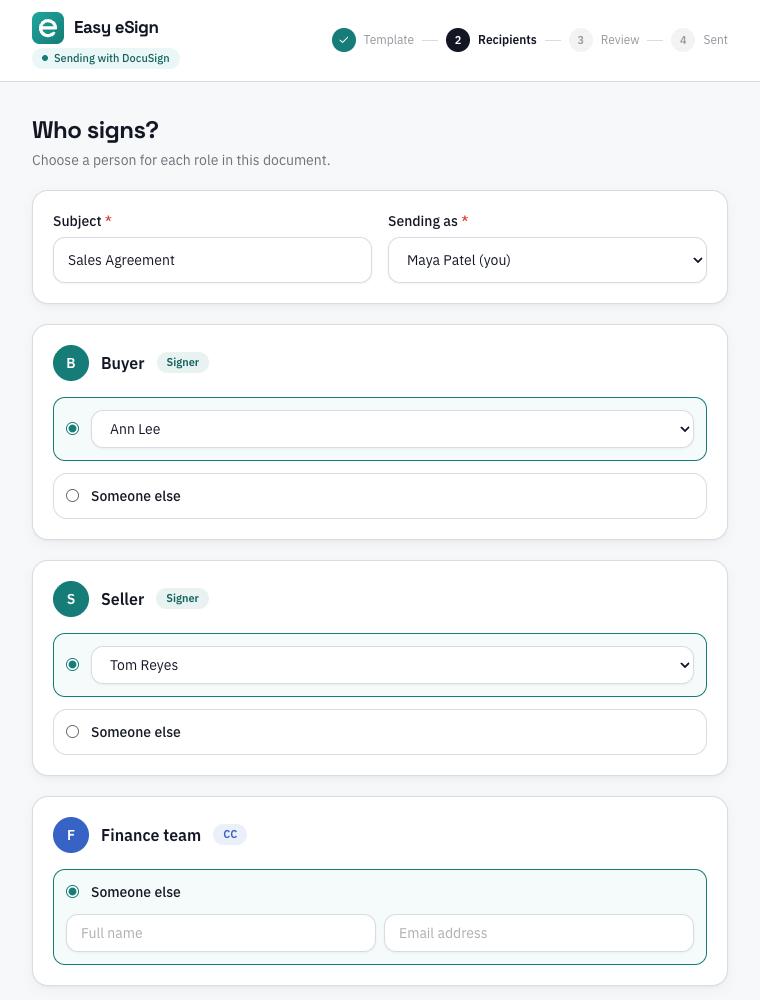
One card per role in the template.
- 1Pick a person linked to the record.
- 2Or choose Someone else and type them in.
- 3A CC role: gets a copy, doesn't sign.
Each person's own boxes show their own details. If one person's box needs to show another person's detail, name it with the role, like Buyer.firstname. See Roles, signers and CC.
Two roles show the same person
The Deal only has one linked contact. Choose Someone else for the second role and type their name and email.
Someone should only get a copy
Use a copy-only role in the template (called Carbon Copy in DocuSign). They receive the finished document and never have to sign.
The signer isn't in HubSpot
Choose Someone else and type their full name and email. Boxes that depend on their HubSpot details can't be filled automatically, so check them on the review screen and type what you need.
A contact can't be picked
They have no email in HubSpot. Add one there, or choose Someone else.
Was this not what you needed? Contact support and tell us what was unclear.