Field names: the complete guide
How to name a box in your template (Deal.amount, Contact.firstname, Company.name) so Easy eSign fills it from HubSpot, and how to copy the exact names.
To fill a box, give it a name with two parts and one dot: the kind of record, then the detail.
In your template (what you type)
This agreement is between Company.name and Contact.firstname Contact.lastname for Deal.amount USD.
What the signer receives
This agreement is between Acme Ltd and Ann Lee for 5000 USD.
The first part: which record
| Type | Means |
|---|---|
Deal | A Deal |
Contact | A person (a Contact) |
Company | A Company |
Your custom object's name | A record of your own custom object, e.g. Realestate_properties |
A role's name | The person picked for that role, e.g. Buyer or Seller |
Capital letters don't matter in this first part. Which record it means depends on where you are sending from: see Which record does each name use?
The second part: which detail
This is HubSpot's internal (code) name for the detail, not the label you see on screen. It is lowercase, has no spaces and often uses underscores.
| On screen in HubSpot | Code name to use |
|---|---|
| Deal Name | dealname |
| Close Date | closedate |
| First Name | firstname |
email | |
| Company name | name |
Don't guess: copy the name
Open Field tokens in the Easy eSign menu. It lists every detail with a Copy button. Paste the name into your template.
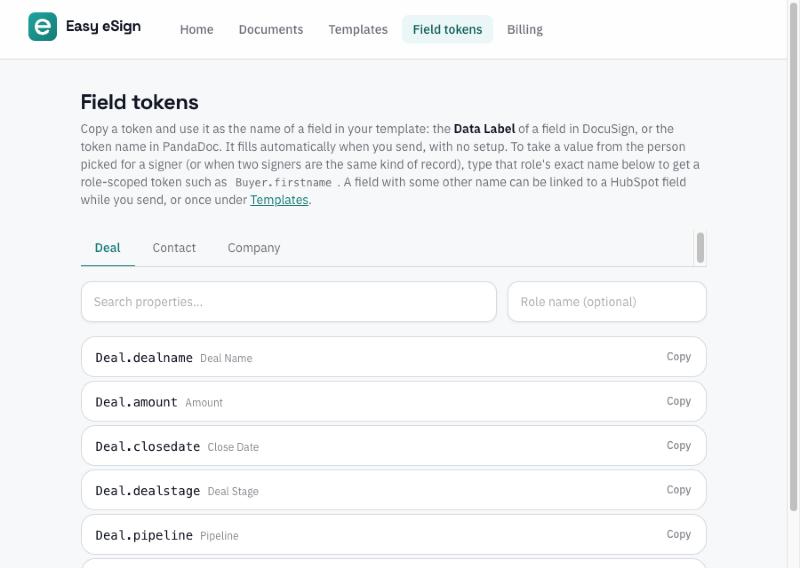
The Field tokens page.
- 1Choose the kind of record: Deal, Contact, Company or a custom object.
- 2Optional: type a role's name (like Buyer) to get names such as Buyer.firstname.
- 3Click Copy, then paste it into your template.
Where to type the name
- DocuSign: in the field's Data Label. Steps
- PandaDoc: in square brackets in the text,
[Deal.amount]. Steps - Dropbox Sign: as the field name. Steps
Rules
- One dot, no spaces:
Deal.amount. - The same name can be used in several places. They all show the same value.
- A box with a different name isn't an error. It starts empty and you fill it before sending (see the next guide).
- If a detail is blank in HubSpot, the box is blank too.
What to read next
Was this not what you needed? Contact support and tell us what was unclear.